
TL;DR: Google Maps still has no turn-by-turn navigation in South Korea (as of September 2026), so download Naver Map before your trip. Switch it to English in Settings → Language, search major places in English, paste Korean names for small shops, and use it for subway, bus, and walking directions. No Korean phone number or account required.
Why Your Google Maps Won’t Work in Korea
Here’s the thing nobody tells you until you’re standing outside Incheon Airport, jet-lagged, staring at a blank screen: Google Maps is half-broken in South Korea.
It knows where you are. It’ll even name the coffee shop across the street. But ask it to drive you to your hotel in Hongdae, or walk you to Gyeongbokgung Palace, and it quietly gives up. No blue line. No turn-by-turn voice. No route at all.
This isn’t a bug. It’s the result of a nearly two-decade standoff over map data. South Korea’s government long refused to let Google export the high-precision 1:5,000-scale base map data that turn-by-turn navigation requires, citing national security. On February 27, 2026, the government finally approved the export under strict security conditions — military sites blurred, data processed on domestic servers, an emergency “red button” mechanism. But approval isn’t the same as a product launch: as of August 2026, Google had made no official announcement of turn-by-turn navigation going live in Korea, and in real-world tests the feature still doesn’t work.
So what do tens of millions of Koreans use instead? Naver Map — made by Naver, Korea’s homegrown search giant. It draws over 30 million monthly users (WiseApp data cited by the Korea Herald), far ahead of every competitor, because it has complete access to Korea’s road and transit data: real-time bus locations, exact subway exits, walking routes through underground arcades that Google simply doesn’t have.
The good news: Naver Map has a proper English interface. The slightly-less-good news: nobody explains how to set it up until you’re already lost. That’s what this guide is for.
How Do I Change Naver Map to English?
First, download the app. Search “Naver Map” in the App Store (iPhone) or Google Play (Android) and install it before you leave home — ideally over your home Wi-Fi, not while fighting airport connectivity. The app is free.
The app defaults to Korean, but switching to English takes about thirty seconds. The exact steps depend on your phone:
On Android:
- Open Naver Map.
- Tap the menu icon (≡) in the bottom-right corner.
- Tap the gear icon (⚙️) to open Settings.
- Find Language (언어) and select English.
- Restart the app.
On iPhone:
Recent versions of Naver Map follow your phone’s system language automatically. If the app opens in Korean anyway:
- Open Naver Map and tap the profile icon (person shape) at the top of the screen.
- Tap the gear icon for Settings.
- Find Language and select English.
- Relaunch the app.
That’s it. Menus, buttons, route instructions, and most place names will now appear in English.
What Actually Translates (and What Doesn’t)
Setting realistic expectations will save you confusion later. Here’s an honest breakdown:
| Element | In English? |
|---|---|
| App menus and buttons | Yes |
| Route and direction instructions | Yes |
| Major landmarks and subway stations | Yes (often shown in Korean + English together) |
| Well-known restaurants and hotels | Mostly yes |
| Small independent cafés and shops | Often Korean only |
| User reviews | Partial — some translated, many Korean only |
| Some booking and reservation screens | Korean only |
Seeing Korean text after switching to English is not a setup error. Small businesses register their names in Hangul (the Korean alphabet), and user reviews are written by Koreans, in Korean. This is normal, and it doesn’t stop you from navigating. For the Korean-only bits, Google Translate’s camera mode is your friend — point it at the screen and it overlays a translation in real time.
One genuinely useful quirk: major place names often display in both Korean and English. Don’t see this as clutter — it’s a feature. When you need to show a taxi driver or a local where you’re going, the Korean name is right there.
How Do I Search for Places Without Knowing Korean?
This is where most visitors get stuck, so let’s go through it carefully. Naver Map’s search is excellent, but it rewards you for knowing a few tricks.
1. Start with English for famous places
For major attractions, hotels, and subway stations, English usually works fine:
- “Gyeongbokgung Palace” or “경복궁”
- “Hongik University Station” or “홍대입구역”
- “Myeongdong” for the shopping district
- “cafe” or “coffee” for nearby coffee shops
Hotels booked on international platforms are generally searchable by their English names.
2. Copy and paste the Korean name when English fails
Here’s the single most useful trick in this entire guide. Thousands of small restaurants, bars, and boutiques are registered only in Korean. Typing their English or romanized name returns zero results, and you’ll assume the place doesn’t exist. It does — you’re just searching wrong.
Instead, find the Korean name and paste it in:
- Where to find it: the restaurant’s Instagram bio, its official website, your hotel’s recommendation list, or a travel blog.
- How: long-press to copy the Hangul text, paste it directly into Naver Map’s search bar.
- Why it works: Naver’s database is built on Korean registrations, so the Korean name is the primary key. The hit rate is dramatically higher than English.
I can’t stress this enough: if an English search comes up empty, don’t give up — paste the Korean name. Nine times out of ten, the place appears instantly.
3. Search by phone number
This one sounds strange until you try it. Naver Map indexes virtually every registered business in South Korea by its landline telephone number. If you have a restaurant’s number — from Instagram, Google, or a blog — paste the digits (Korean landlines are typically 10 digits starting with 02, 031, etc.) straight into the search bar. A pin drops directly on the storefront. It’s the most reliable search method in the app, full stop.
4. Use the Korean address for your hotel
Before you fly, save your accommodation’s Korean address. Booking platforms often show only the English address by default, but the Korean address is what Naver Map — and taxi drivers — actually use. Check your booking confirmation email, the hotel’s own website, or just message the property and ask for the Korean address (한국 주소). Save it in your phone’s notes app. You’ll thank yourself at 1
 a.m. trying to get home.
How Do I Get Directions in Naver Map?
Getting from A to B is the app’s core job, and it does it well. Here’s how to read what it tells you.
Subway and bus

- Search your destination and tap it.
- Tap the directions button (길찾기).
- Your current location fills in automatically as the starting point. To change it, tap the origin field and search a different station or address.
- You’ll see route options ranked by travel time, with icons for subway (지하철), bus (버스), and combinations.
Each option shows the total time, the fare in won, the number of transfers, and — critically — which subway exit to take at your destination. In a city where a single station can have a dozen exits spread across several blocks, the exit number matters enormously. Naver Map also tells you which train car to board for the fastest transfer, a detail locals rely on daily.
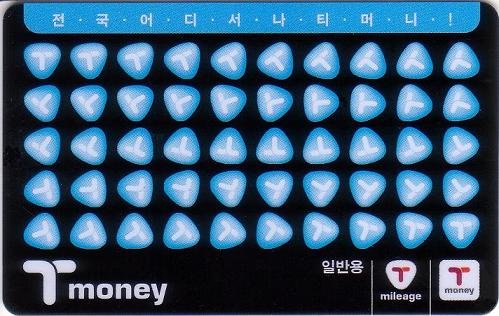
The app shows real-time arrivals, so if it says your bus is 4 minutes away, it means 4 minutes. Fares shown reflect the current base fare (₩1,550 with a T-money card as of 2026), and a T-money card is still the simplest way to pay. Since March 2026, station kiosks at major Seoul stations also accept foreign cards for single-journey tickets and tourist transit passes (with a ~3.7% fee), and iPhone users can add a Mobile T-money card to Apple Wallet and top it up with a foreign Mastercard — but a physical T-money card topped up with cash remains the most reliable option for most visitors. [INTE
 RNAL: t-money card guide]
Walking
Walking directions in Naver Map are detailed to a degree that surprises first-timers: it routes you through underground shopping arcades, elevated walkways between buildings, and pedestrian underpasses that don’t exist on Google Maps at all. Follow the blue line and the turn prompts. One caveat: in dense areas like Myeongdong or Gangnam, the route display can look cluttered. Zoom in and follow it step by step.
Driving and taxis
If you’re renting a car or comparing with a taxi, the driving mode gives accurate times with live traffic. For hailing a ride as a foreigner, though, you’ll want a separate app — that’s a whole separate guide. [INTERNAL: kakao t vs k.ride vs uber]
Saving Places: Build Your Map Before You Fly
Here’s a pre-trip ritual worth adopting: every time you read about a restaurant, café, or viewpoint you want to visit, save it in Naver Map immediately.
Tap any place, then the bookmark or favorite icon. You can organize saves into custom lists — many travelers make color-coded folders like “Seoul food,” “Day trips,” and “Hotel.” When you land, your personal map of Korea is already dotted with pins. No account is strictly required for basic use, but creating a free Naver account syncs your saves across devices, which is worth doing if you switch phones or share planning with a travel partner.
Do I Need Mobile Data or a Korean Phone Number?
Short answer: data, yes — absolutely. Korean phone number, no.
Naver Map assumes you’re online. It streams map tiles, live transit positions, and route calculations in real time. Its offline support is limited, and even Google Maps’ offline downloads don’t work properly in Korea for the same data-restriction reasons. Trying to navigate Seoul on airport Wi-Fi alone is a recipe for standing on a street corner, phonelessly lost, which is exactly the travel story you don’t want.
The practical fix is to sort out mobile data before you board your flight. For most visitors in 2026, that means an eSIM: you buy it online, scan a QR code, and land with data already working — no hunting for a SIM counter at Incheon at midnight. It’s also worth comparing your options, because prices and data allowances vary more than you’d expect. [AFFILIATE: eSIM]
As for a Korean phone number: you don’t need one for Naver Map’s core features — search, directions, and transit all work without an account. A number only becomes relevant for extras like in-app taxi payment or certain reservation features, which most short-term tourists never touch.
Naver Map vs. KakaoMap vs. Google Maps
You’ll hear about KakaoMap too — it’s the other big Korean navigation app, made by the company behind KakaoTalk. Here’s how the three compare for a tourist in 2026:
| Naver Map | KakaoMap | Google Maps | |
|---|---|---|---|
| English interface | Yes (plus Chinese, Japanese) | Yes, slightly more limited | Yes, fully |
| Finding Korean places | Best of the three | Good, patchier in English | Good UI, weak local data |
| Subway and bus routing | Strong, real-time | Strong, real-time | Unreliable |
| Walking directions | Detailed | Often cleaner to read | Frequently unavailable |
| Business hours and reviews | Deepest coverage | Decent | Sparse or outdated |
| Taxi hailing | Links out to other apps | Built-in Kakao T handoff | None in Korea |
| Cost | Free | Free | Free |
The practical verdict: lead with Naver Map for finding places and planning routes. Keep KakaoMap as a backup — some travelers prefer its cleaner walking directions, and it hands off smoothly to Kakao T if you need a taxi. Keep Google Maps installed too, not for navigation but as a translation bridge: it’s often the easiest way to turn a place name from an English travel site into Korean text you can paste into Naver Map.
Frequently Asked Questions
How do I change Naver Map to English?
Open the app, go to Settings via the menu (≡) or profile icon, find Language (언어), and select English. On iPhones, newer versions follow your device language automatically. Restart the app after switching.
Is Naver Map really free?
Yes. Download, search, directions, transit info — all free, with no account required for core features. There’s no tourist surcharge or premium tier blocking navigation.
Why does Google Maps not work properly in Korea?
South Korea restricted the export of high-precision map data on national security grounds for nearly two decades, which blocked Google’s turn-by-turn navigation. The government approved data export on February 27, 2026, under strict conditions, but as of September 2026 Google had not launched turn-by-turn navigation in Korea.
Do I need a Korean phone number to use Naver Map?
No. Search, directions, subway and bus routing all work without an account or Korean number. An account (free) is only useful for syncing saved places across devices.
Can I use Naver Map without mobile data?
Not realistically. The app needs an internet connection for maps, live transit, and routing, and offline support is limited. Arrange an eSIM or local SIM before you arrive. [AFFILIATE: eSIM]
Why can’t I find a restaurant by its English name?
Small businesses are usually registered in Korean only. Copy the Korean name from the restaurant’s Instagram or website and paste it into Naver Map’s search bar — or paste its phone number, which the app indexes directly.
Does Naver Map work outside Seoul?
Yes — nationwide, including Busan, Jeju, and smaller cities. Coverage is one of its main advantages over Google Maps: because it’s built on domestic data, rural bus routes and small-town addresses work just as well as Seoul subway lines.
Your Pre-Flight Checklist
- Download Naver Map over home Wi-Fi.
- Switch it to English in Settings → Language.
- Save your hotel using its Korean address.
- Bookmark every restaurant and sight on your itinerary.
- Sort out mobile data (eSIM recommended) before departure. [AFFILIATE: eSIM]
- Screenshot or note the Korean names of must-visit small restaurants.
Do those six things on the plane, and you’ll navigate Korea with the quiet confidence of someone who’s done it ten times before. The map that 30 million Koreans open every month is now in your pocket — in your language.
Traveling beyond Seoul? Next, read our [INTERNAL: seoul subway guide for foreigners] and [INTERNAL: incheon airport to seoul] guides. Last updated September 30, 2026 — app interfaces change with updates, so menu labels may vary slightly by version.